 yapern
aivs - the ai video studio
Sue and Joe are stranded beside a station wagon on a desert road. Joe has looked under the hood. “Good news. It’s definitely the car.” Sue has a postcard from her dad and a questionable promise that the ocean is somewhere nearby. It’s a tiny scene, five lines of dialogue, but it already creates a useful problem for an AI video tool: I want to choose who plays these people without rewriting who they are.
AIVS is the AI video studio I’m building around that workflow. It’s a native Rust app with a screenplay, a character gallery, and local video generation on Apple Silicon. The current version handles one built-in scene, Last Light, as a continuous shot. There’s plenty missing before “studio” means everything you’d expect, but casting gives this first scene something more useful than another giant prompt box.
Sue is a role. Ava can play her.
The script originally called its two people Ava and Eli, the same names as their saved character profiles. The rename to Sue and Joe made the distinction explicit. Ava belongs in the library of performers; Sue belongs in the story. Recasting Sue shouldn’t require hunting through the script to replace every name.
Now you can drag Ava’s portrait or name onto any of Sue’s dialogue blocks. Every Sue cue gets the same assignment. Drop Eli onto Joe, and both parts are cast. Clicking a dialogue block also opens a picker, including an option to clear the assignment. Selecting a portrait in the gallery just browses it; casting requires choosing a role.

The implementation stores one assignment per role, rather than one per line. The screenplay preview and render prompt also come from the same scene data, so the displayed dialogue isn’t a separate sample that can quietly drift away from what gets generated. Both roles must be cast before Generate video becomes available.
Here’s an excerpt of the resulting prompt. The performer references appear in the cast declaration, while the dialogue still belongs to Joe and Sue:
Cast: @eli plays JOE; @ava plays SUE.

JOE: "Good news. It's definitely the car."

SUE: "My dad said you could see the ocean from here."
Python resolves those references and adds each performer’s saved appearance and voice description. It doesn’t guess the cast from bare names in GUI scripts. Otherwise a role named Ava could accidentally cast itself, undoing the separation we just made. Assignments currently last only for the session, and the screenplay is a preview of the built-in scene, not a script editor yet.
A portrait also tells the model where to put the camera
A character profile contains more than a name. Ava has auburn hair, freckles, an oatmeal sweater, and a description of her voice. The library also holds portraits, voice samples, and wide scene references. It’s tempting to assume that giving the renderer all those assets must make the character more consistent.
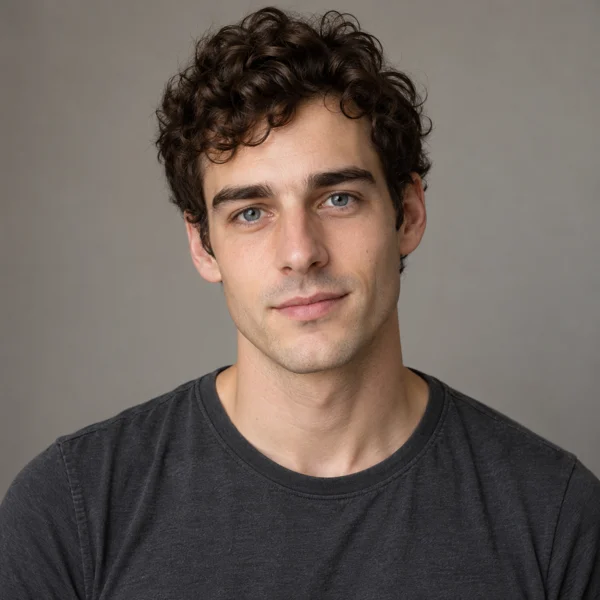
The image input has a catch. In the current backend, it conditions a complete frame. Feed it Eli’s gallery portrait, and you’re also asking it to start with a frame full of Eli’s face. You haven’t supplied a little identity card that the model can place wherever the screenplay needs him.
These are the actual library assets for Eli. The wide reference leaves room for a landscape and his torso; the gallery portrait is a perfectly good way to recognize him in a sidebar, but a lousy starting composition for two people beside a car.
Gallery portrait
Whole-frame scene reference

The CLI can use a scene reference at both the first and last frames to help hold the composition. For the GUI’s ensemble scene, though, Rust explicitly requests text-only character guidance. Neither performer’s solo image gets imposed on the entire scene. That lets the prompt describe both people together, at the cost of weaker control over their exact likenesses. The saved voice samples don’t lock voice identity in this path either.
Getting a scene through the local renderer
The first video workflow came over from Hunter, an earlier project, with Rust taking over setup and process lifetime while Python kept the MLX pipeline. AIVS uses the q8 MLX conversion of LTX-2.5 to generate video and speech together, then encodes the result at 1280 × 704 and 24 frames per second.
Local generation still comes with a substantial first download. Setup expects a Hugging Face token, installs the pinned Python environment, and downloads about 43 GB of model files. The code requires 50 GiB free for setup and checks the cached weights and an Apple GPU calculation before unlocking the workspace. Once those files are present, generation uses the local cache.
The earlier render below used a dialogue-only duration estimate. Its five spoken lines contain 31 words. Budgeting them at 160 words per minute, adding four 0.2-second gaps and a second of padding, then rounding up gives 14 seconds. That leaves no separate allowance for handling the postcard or walking away. Fitting the speech into a clip doesn’t mean there’s time to perform the scene.
Here’s a frame seven seconds into an existing 14-second render of Last Light. This run predates the Sue/Joe rename and explicit casting, so it still uses Ava and Eli as script names. Even with a prompt requesting a wide shot, it puts both faces right up against the camera. Neither the station wagon nor the postcard is visible in this frame. “Keep everyone visible together” leaves the model quite a bit of room to disappoint you.
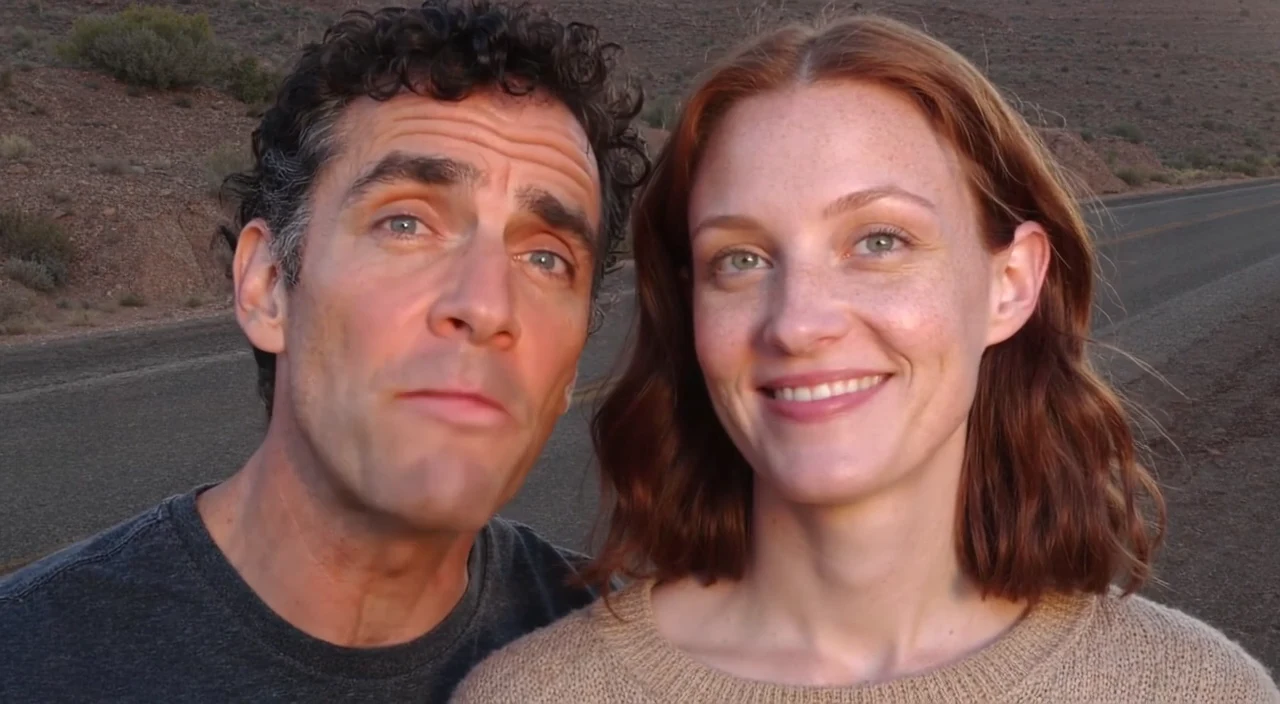
The current working code reserves another three seconds per action paragraph, taking this scene’s budget to 32 seconds. Its revised camera instructions ask for both actors head to toe beside the whole car, with room to move and finish the walk. Those changes give the model a more specific composition and time for the action. The earlier frame above doesn’t establish whether the revised request will work.
A render also needs a way to finish or stop cleanly. Rust runs Python on a worker thread, reads its progress events, and interrupts the process group when you press Stop, including any active FFmpeg work. Progress estimates use measured render work and timings from earlier successful runs on the same machine. They stop short of 100% until the output passes validation. Completed clips play inside the native window through macOS AVKit.
A playable file still needs a director
Each run gets a directory containing the original and expanded prompts in render.json, its seed, timing and runtime details, and snapshots of the character profiles and assets. If a result looks wrong, those saved inputs give you something to inspect after the character library changes.
Before publishing video.mp4, the validator checks decoded frame count, dimensions, frame rate, audio presence, and audio/video timing, then decodes the file with FFmpeg to catch errors. Those checks can reject a broken export. They can’t tell whether Sue said Joe’s line, whether a mouth followed the right voice, or whether the camera ignored the script.
I can now recast Sue without changing her dialogue, and the render keeps a record of whom I assigned. Getting the generated performance to honor that assignment is still unfinished work. That’s what I want AIVS to make easier to work on: keep the scene and cast stable enough that I can judge the next take, rather than reconstructing them in a prompt every time.